 Bhuwan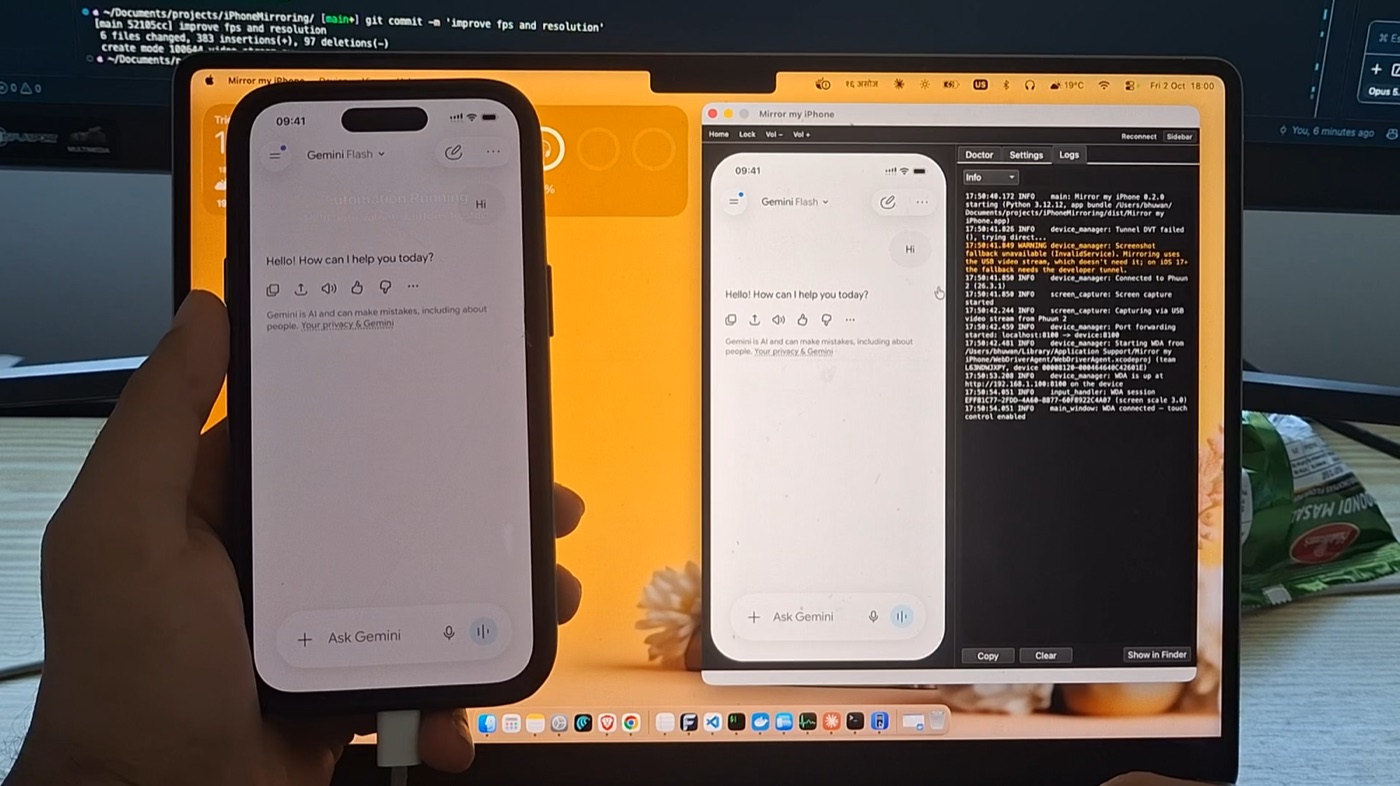

The Story of Mirror my iPhone
Apple built a feature that shows your iPhone on your Mac. Then it switched it off for everyone in the EU. So I built my own, and then I handed it to an AI.
“Unable to Connect to iPhone”
It started on an ordinary evening. I was building an app, the iPhone was plugged into my Mac, and I was doing the usual dance: change some code, pick up the phone, tap through five screens, put the phone down, look at the logs, pick up the phone again.
Then I remembered that macOS has iPhone Mirroring. Your iPhone, right there on your Mac, in a window, controlled with the trackpad. Exactly what I needed. I opened it and macOS said:
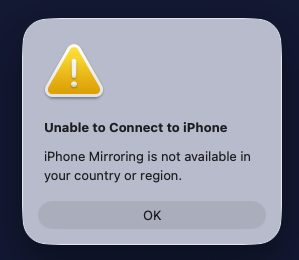
I live in the EU. Apple has switched iPhone Mirroring off here, citing the Digital Markets Act. A perfectly good feature exists on my Mac and my phone, and I can’t use it because of where I’m sitting.
So I did what developers do when a door is locked: I went looking for a window.
The Window: QuickTime and Apple’s Own Developer Tools
Two observations made this project possible.
First, QuickTime Player can already see your iPhone’s screen. Plug in an iPhone, open QuickTime, choose New Movie Recording, and pick the iPhone as the camera. That’s a live, smooth video of the phone’s screen over USB, and it works everywhere, including the EU. If QuickTime can get it, so can my app.
Second, Apple ships tools for tapping on an iPhone. UI testing in Xcode drives a real iPhone: taps, swipes, typing, all of it. WebDriverAgent, the open-source project behind Appium, wraps those tools in a small HTTP server that runs on the phone. Send it a tap, and the iPhone taps.
Put the two together and you have iPhone Mirroring: watch the screen with one, touch it with the other. No jailbreak and no paid developer account; a free Apple ID in Xcode is enough. I started from iPhoneMirroring, an open-source project with the same idea, and rebuilt it into something I wanted to use every day.
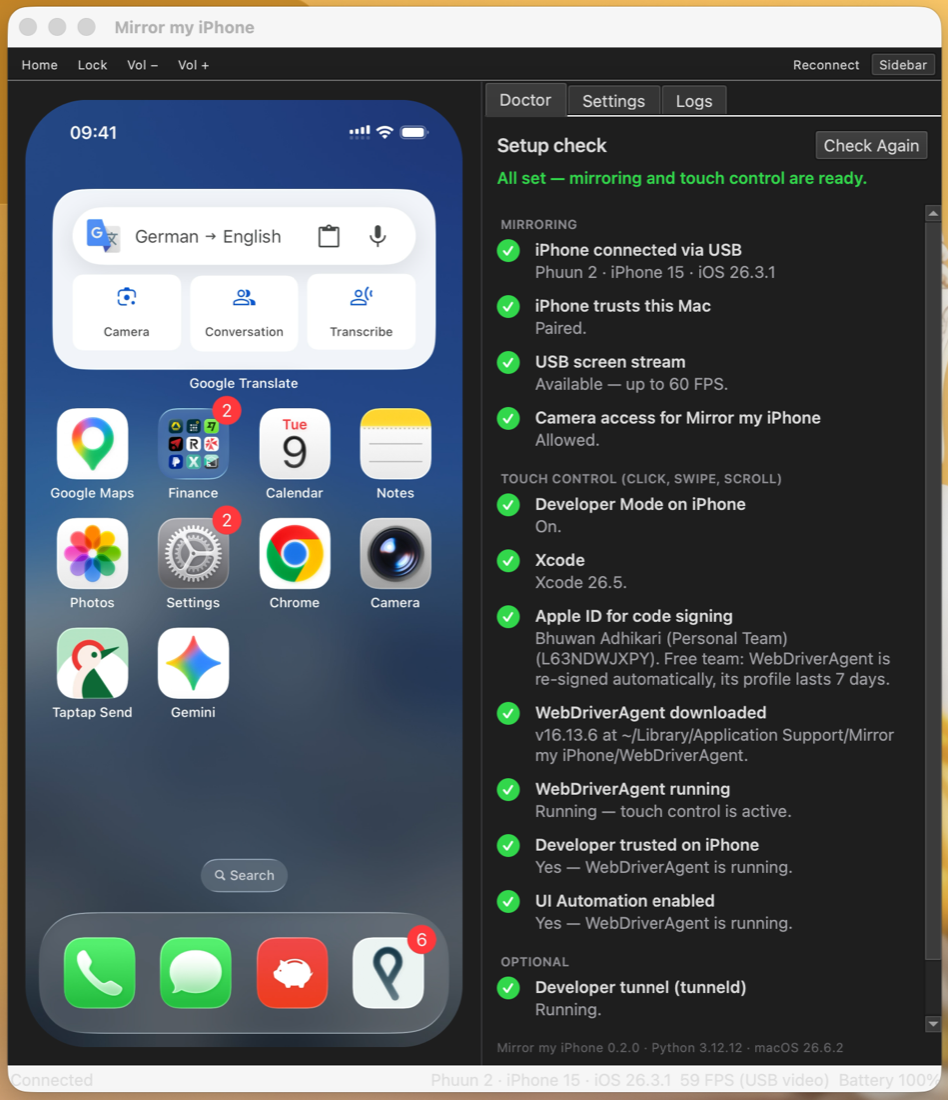
The app: the iPhone on the left at 59 FPS, and the Doctor on the right confirming everything is ready.
Then I Got Greedy: Let the AI Hold the Phone
Mirroring fixed the “pick up the phone, put down the phone” problem. Debugging got noticeably calmer. But I was still the one doing the tapping.
And testing a mobile app is mostly tapping. Open the app, log in, go to that screen, scroll, tap the button, check that the thing appeared. Do it again after every change. It’s exactly the kind of work I’d rather describe than do.
The mirror already had everything an AI agent needs: it can see the screen and it can touch the screen. So I gave agents a way in. Mirror my iPhone now includes an MCP server, so Claude Code, Claude Desktop, Cursor and other MCP clients can use the iPhone directly. One command connects it to Claude Code:
claude mcp add --scope user mirror-my-iphone -- "/Applications/Mirror my iPhone.app/Contents/Resources/bin/mirror-my-iphone" mcp
Then I can say “open my app, sign in with the test account, add an item to the cart and tell me if the total is right”, and Claude does it. It takes a screenshot, reads what’s on the screen, taps, swipes and types its way through, and reports back. I watch every touch land on the mirrored screen as a blue dot.
That changed how I debug. The AI walks through a flow on a real iPhone, not a simulator, while I read the logs. When something breaks, it describes what it saw. When I fix it, it runs the flow again.
It’s still my own phone, so the agent is told to ask before anything hard to undo, like sending a message, buying something or deleting data.
Features
- Smooth 60 FPS mirroring: scrolling, animations and videos look natural, over a plain USB cable
- Full control from the Mac: click to tap, drag to swipe, scroll with the trackpad, click and hold for a long press
- Buttons and sound: Home, Lock and volume from the toolbar or keyboard shortcuts, and the iPhone’s audio plays on the Mac
- Built for AI agents: an MCP server, a command line tool (
mirror-my-iphone tap 196 400) and a local HTTP API, so any agent can take screenshots, read the elements on screen, tap, swipe, type, press buttons and open apps - The Doctor: a guided setup check that inspects the iPhone and the Mac and shows how to fix anything missing, often with one click
- Works in the EU: and everywhere else, since it doesn’t depend on Apple’s iPhone Mirroring
- Private and free: everything stays on your Mac and the cable. No account, no telemetry, MIT licensed
| Mirror my iPhone | Apple iPhone Mirroring | |
|---|---|---|
| Works in the EU | ✅ | ❌ |
| Control with mouse and trackpad | ✅ | ✅ |
| AI agents can use it | ✅ | ❌ |
| Connection | USB | Wireless |
| Price | Free, open source | Built in |
Technical Architecture
The app is written in Python with a PyQt6 interface, and it’s made of four main parts.
1. The screen: a 60 FPS video stream over USB. iOS devices can appear on a Mac as video capture devices, the same way a webcam does, but macOS hides them by default. The app flips a CoreMediaIO switch (kCMIOHardwarePropertyAllowScreenCaptureDevices) so the iPhone shows up, then reads it with AVFoundation, exactly like QuickTime does. That’s why macOS asks for camera permission: as far as it’s concerned, the iPhone’s screen is a camera. A nice side effect: while the stream is running, iOS shows a clean status bar (09:41, full battery). If the stream isn’t available, the app falls back to screenshots through pymobiledevice3 at around 20 FPS.
2. Touch: WebDriverAgent. The app builds WebDriverAgent with xcodebuild, signs it with the first Apple ID it finds in Xcode, installs it on the iPhone and starts it. Mouse positions are converted from window pixels to iPhone points (393 × 852 on an iPhone 15) and sent as W3C pointer actions. All gestures go through one queue on a worker thread, so my mouse and an AI agent never fight over the same finger.
3. The agent API. While the app runs, it serves a small HTTP API on 127.0.0.1. The MCP server and the command line tool are both thin clients of it. Every request needs a token from a file only your user account can read, and the API refuses any request that comes from a web page, so a random website can’t start tapping on your phone.
4. Packaging. A Python app normally shows up in the Dock as “Python”, and macOS permission prompts would ask about “Python” too. So the .app has a tiny native launcher written in C that loads libpython into its own process. The Dock shows Mirror my iPhone with its own icon, and the camera prompt names the right app.
 iPhone ──USB──┬── video stream (AVFoundation) ──► Mac window (PyQt6) ◄── you: mouse & trackpad
               │                                        │
               └── WebDriverAgent (on the iPhone) ◄─────┤  one gesture queue
                                                        │
               Claude / Cursor ──MCP──► agent API (127.0.0.1) ──┘
                         CLI ─────────►
Install It
The easiest way is Homebrew. The repository is its own Homebrew tap:
brew tap bhuwanadhikari/mirror-my-iphone https://github.com/bhuwanadhikari/mirror-my-iphone
brew trust bhuwanadhikari/mirror-my-iphone
brew install --cask mirror-my-iphone
You need a Mac with macOS 13 or later, an iPhone with a USB data cable, and Xcode for touch control. Open the app, plug in the iPhone, tap Trust, and allow camera access. The Doctor takes it from there. Mirroring alone works right away; touch control needs Developer Mode on the iPhone and a free Apple ID in Xcode, and the Doctor walks you through both.
Prefer building it yourself? Clone the repository and run packaging/build_app.sh.
What I Learned
A locked door usually has a window next to it. Apple’s iPhone Mirroring is off in the EU, but the pieces it’s built from aren’t. QuickTime’s USB stream and Xcode’s UI testing tools were there all along. The fastest route around a restriction was to look closely at what the platform already does for its own tools.
Agents need to know when the screen is done moving. A screenshot taken right after a tap often catches a half-finished animation: a screen sliding in, a button mid-fade. An agent that acts on that picture is acting on a screen that’s about to disappear. So after a gesture, the app keeps comparing small, downscaled copies of the incoming frames and only returns a screenshot once they stop changing. Every gesture answers with that settled screenshot, so the agent always sees the result of its last step.
Give the AI coordinates it can trust. Agents are much better at tapping the right thing when they don’t have to guess. So the screenshot pixels are the same as the iPhone’s points, and a describe_ui tool lists the elements on screen with the exact point to tap. Fewer conversions, fewer misses.
A local API is still an attack surface. “It only listens on localhost” isn’t enough when a browser can send requests to localhost too. A token in a private file, plus refusing anything with an Origin header, keeps the phone safe from web pages.
Setup is the product. Mirroring an iPhone touches USB trust, camera permissions, Developer Mode, Xcode accounts, code signing and a seven-day signing profile on free Apple IDs. Each one is easy, but together they’re a wall. The Doctor, which checks every step and explains how to fix it, turned out to matter as much as the mirroring itself.
Shipping is its own project. Turning a Python script into a Mac app that installs with one brew command meant writing a native launcher, managing a Python environment outside the app bundle, and writing a release script that builds the zip, updates the Homebrew cask and publishes the GitHub release in one step.
Current Limitations
- USB only: it needs a cable that carries data; there’s no wireless mode
- No Mac keyboard typing yet: agents can type into the iPhone, but you can’t type with your Mac keyboard, and a double click arrives as two separate taps
- The screen has to be on: the picture pauses while the iPhone sleeps, so it helps to raise Auto-Lock while testing
- Swipes play on release: WebDriverAgent only accepts whole gestures, so a drag happens on the iPhone when you let go of the mouse
Try It
Mirror my iPhone is free and open source on GitHub. Install it with Homebrew, plug in your iPhone, and if you’re in the EU, enjoy the feature you were told isn’t available in your country or region.
And if something breaks, open an issue. Or let your AI do it.